
How to Enable Sync Library on iPhone or iPad
Sync Library is the iOS setting that makes your Apple Music or iTunes Match library available across all your devices, and to apps like Stezza. Here's how to turn it on.
Sync Library (formerly “iCloud Music Library”) is the iOS setting that mirrors your music library to the cloud and makes it available across every device you sign into with the same Apple ID, including third-party players like Stezza.
If you subscribe to Apple Music or iTunes Match and your library looks empty in Stezza, this setting is almost always the cause.
What Sync Library does
When Sync Library is on, your device’s Music library includes:
- Songs you’ve added to your Apple Music library (the “+” button in the Music app)
- Tracks matched or uploaded by iTunes Match
- Music you’ve imported on a Mac or PC, if Sync Library is also on there
When Sync Library is off, only music you’ve directly synced via cable from a Mac or PC appears in the library.
Stezza reads from your iOS Music library, so anything Sync Library puts there is automatically available to play.
Turn it on (iOS 18+)
- Open Settings.
- Scroll down and tap Apps.
- Tap Music.
- Under the Library section, switch on Sync Library.
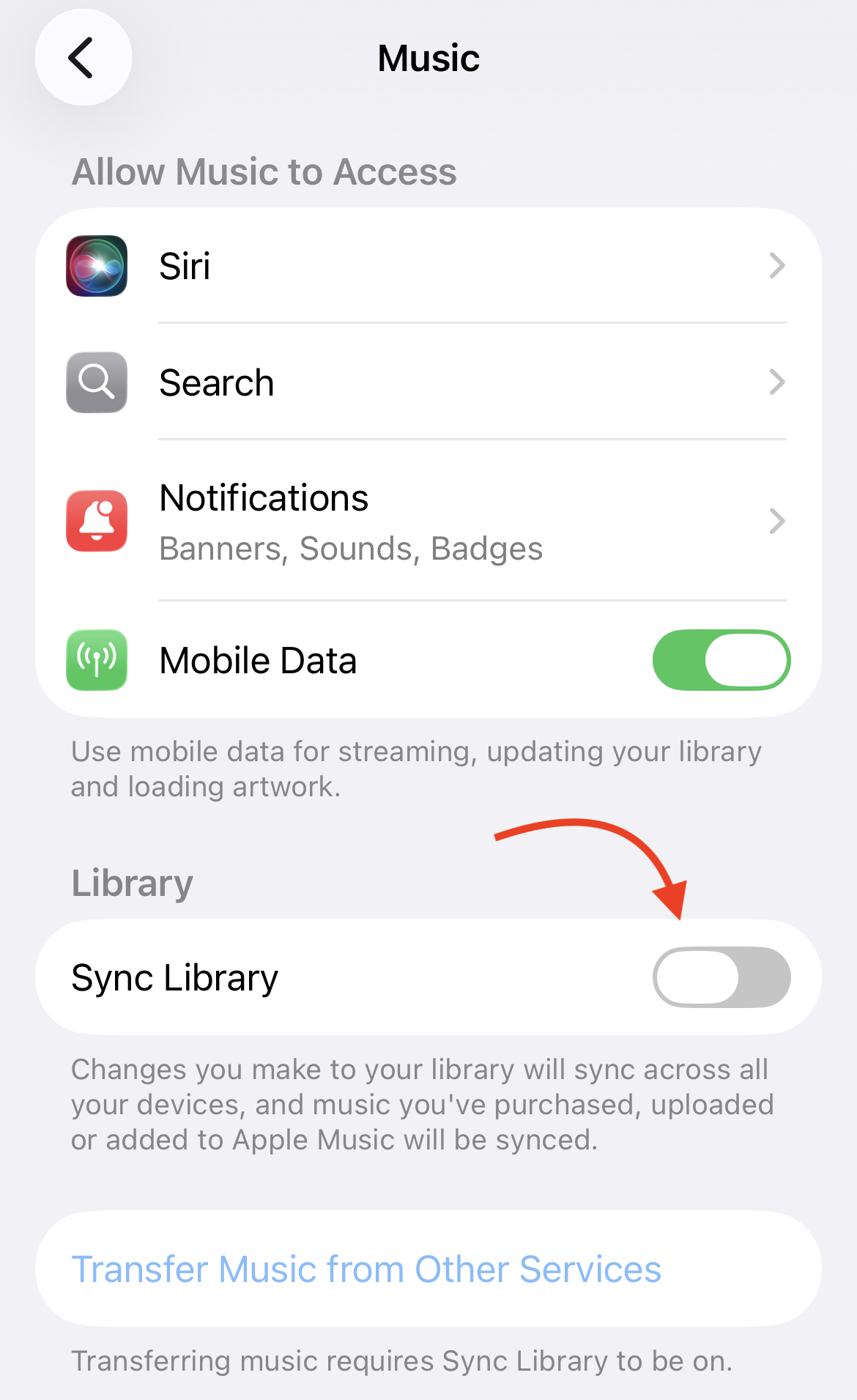
The toggle is a few sections down, past Allow Music to Access, Notifications, and Mobile Data. Look for the Library heading.
If you don’t see a Sync Library toggle at all, you don’t have an active Apple Music or iTunes Match subscription on the Apple ID currently signed in. Sync Library only appears when one of those is active.
Turn it on (Mac)
- Open the Music app.
- From the menu bar, choose Music → Settings… (or press ⌘,).
- Click the General tab.
- Tick Sync Library.
- Click OK.
How long does it take?
For small libraries, Sync Library populates in seconds. For larger libraries (10,000+ tracks), give it 5 to 30 minutes for everything to appear.
If Stezza still looks empty after that, force-quit and relaunch it so it picks up the refreshed library.
Apple’s documentation
For Apple’s official details, see Sync your music library across your devices with Sync Library on Apple Support.
Related
- Does Stezza Work with Apple Music?
- Does Stezza Work with iTunes Match?
- My Music Library Looks Empty in Stezza
Related Guides
Enjoy your music, your way
Stezza is a simple, stylish music player built for your iTunes and Apple Music library.
Get Stezza